Experimentos de SEO baseados em dados do GSC e GA4
Execute experimentos de SEO de antes e depois ou com grupo de controlo em qualquer página, grupo ou segmento, tudo com base nos seus dados do Google Search Console e GA4.
Principais funcionalidades da ferramenta SEO Tests
Testes de antes e depois
Um teste de antes e depois compara as suas métricas durante um período definido antes de uma alteração com o mesmo período de tempo depois.
Escolha uma única página, um grupo de páginas ou um segmento guardado como âmbito. O Sitechecker obtém automaticamente o período anterior correspondente, alinhado pelo dia da semana, para que os dois períodos sejam comparáveis.
Verá a alteração de cada métrica selecionada ao longo do período de teste e do período de comparação.
Escolha uma única página, um grupo de páginas ou um segmento guardado como âmbito. O Sitechecker obtém automaticamente o período anterior correspondente, alinhado pelo dia da semana, para que os dois períodos sejam comparáveis.
Verá a alteração de cada métrica selecionada ao longo do período de teste e do período de comparação.
Testes com grupo de controlo
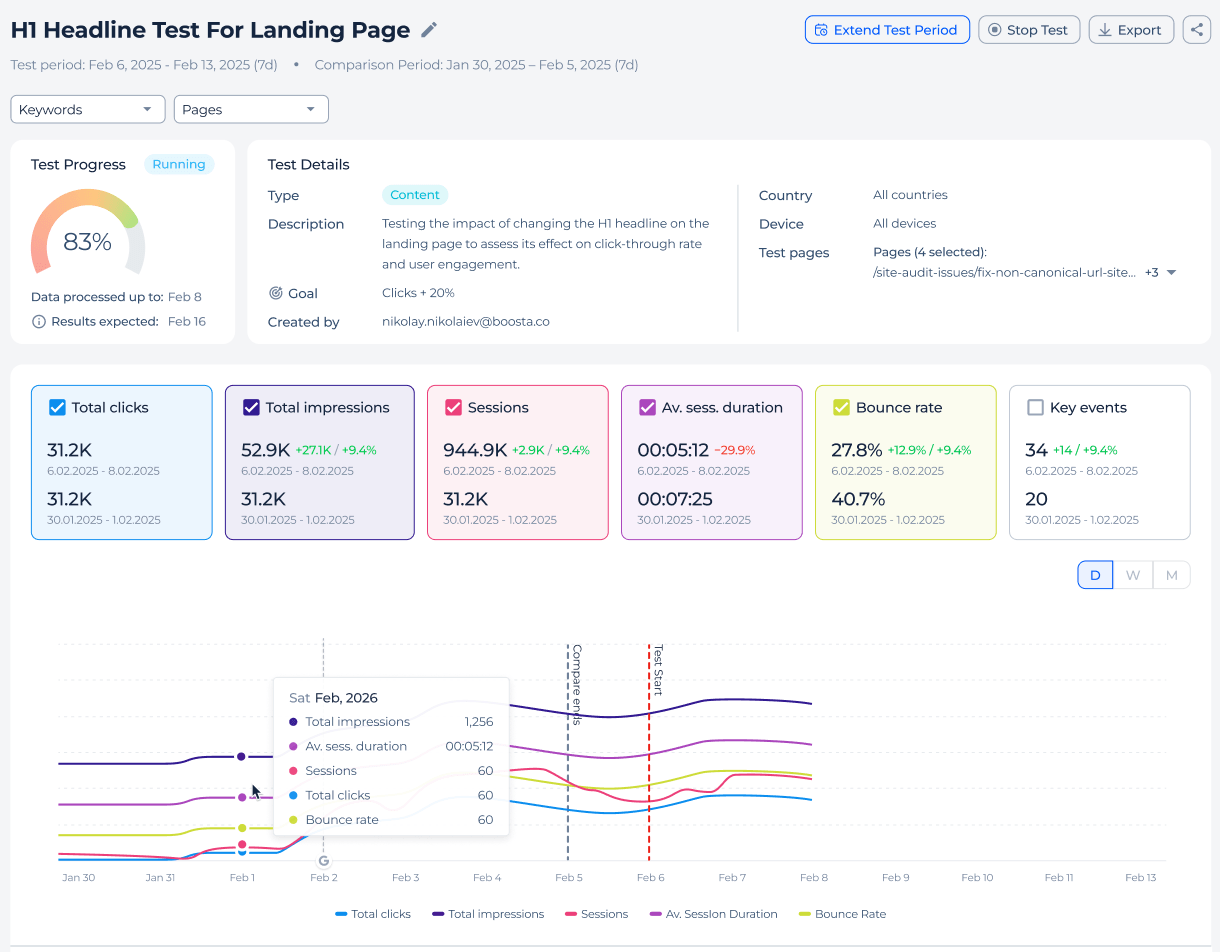
Um teste com grupo de controlo compara as páginas alteradas com um conjunto de páginas semelhantes que deixa inalteradas. Isto permite isolar o efeito da sua alteração das tendências gerais de pesquisa.
Para cada métrica, verá a alteração no grupo de teste, a alteração no grupo de controlo e o ganho líquido entre eles. O veredito final baseia-se nesse ganho líquido, e não apenas na alteração bruta do grupo de teste.
Para cada métrica, verá a alteração no grupo de teste, a alteração no grupo de controlo e o ganho líquido entre eles. O veredito final baseia-se nesse ganho líquido, e não apenas na alteração bruta do grupo de teste.
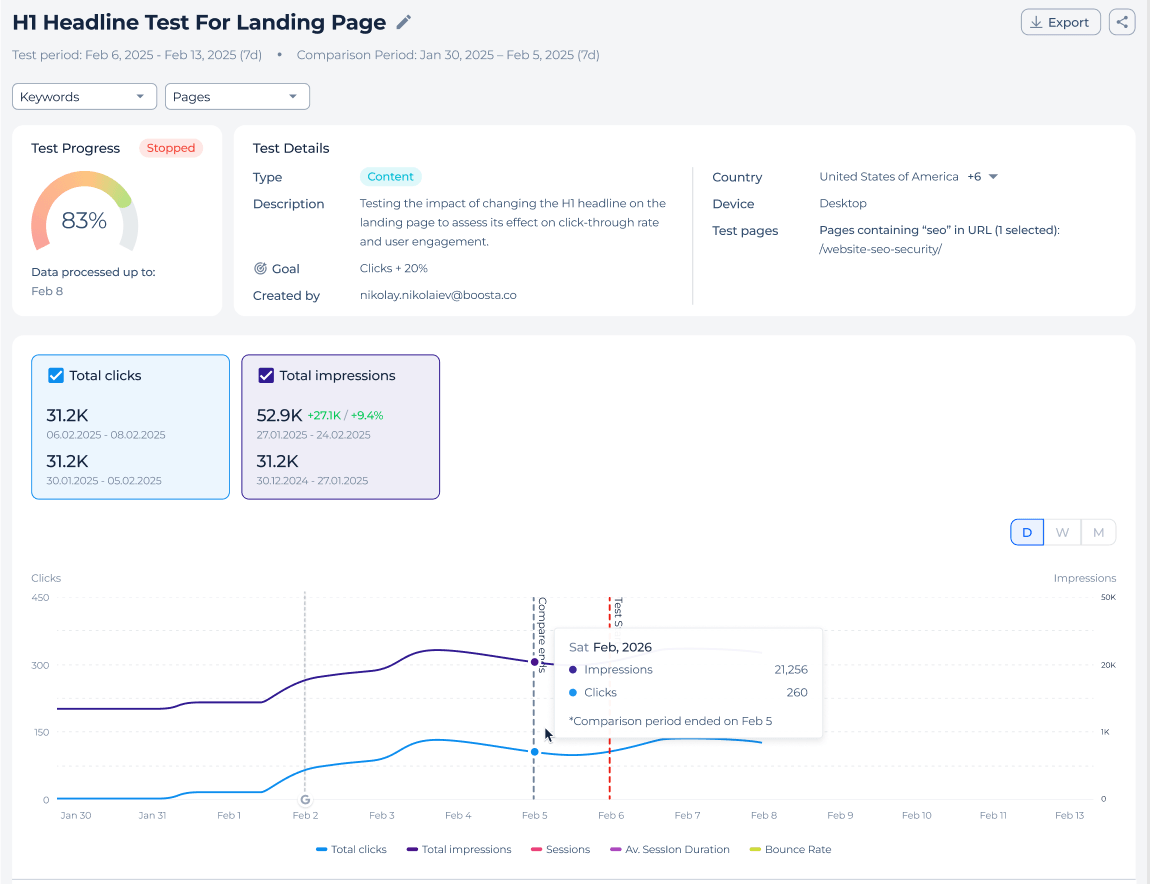
Métricas (GSC + GA4)
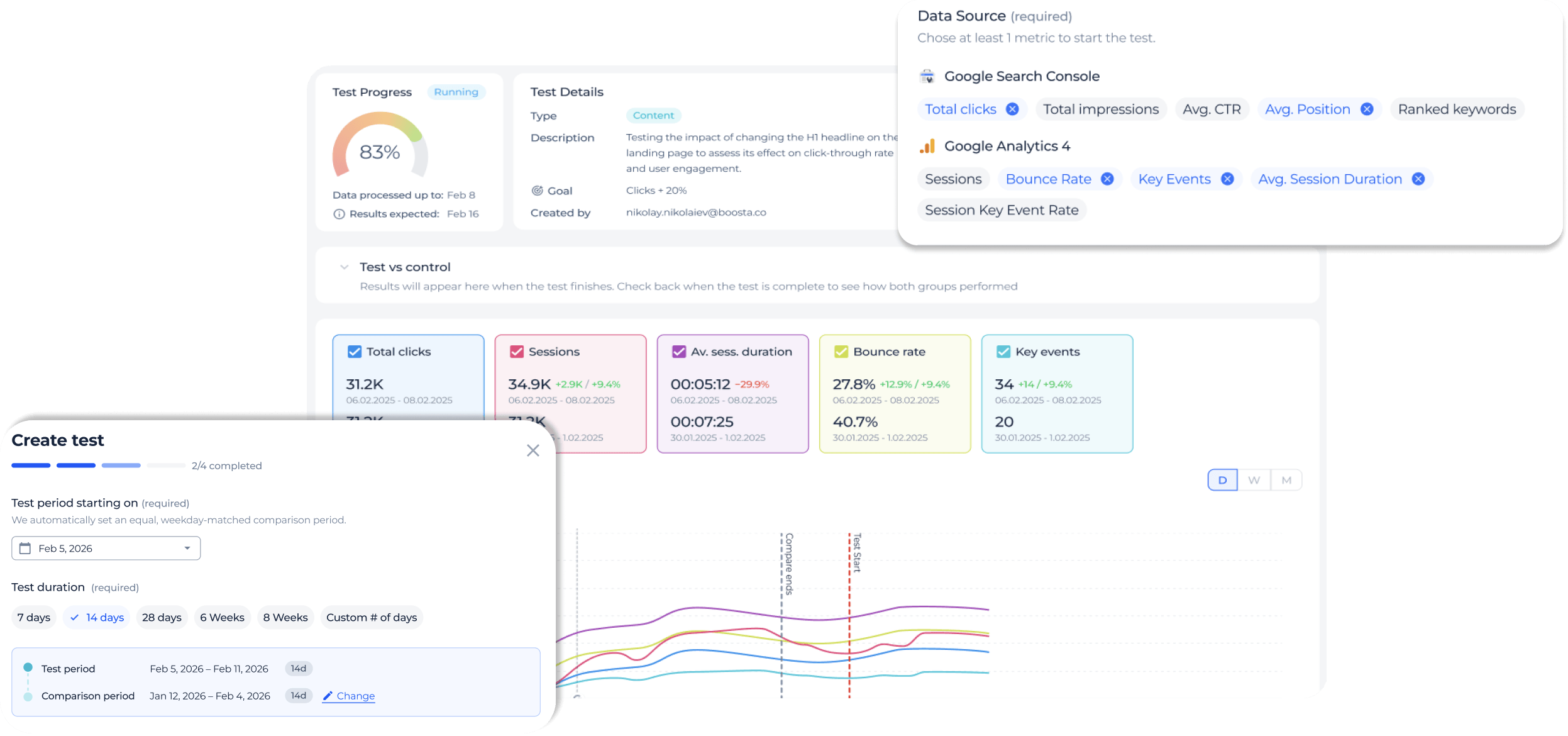
Todos os experimentos de SEO baseiam-se nos dados do Google Search Console, com métricas do GA4 disponíveis como complemento.
A partir do GSC pode acompanhar cliques, impressões, CTR, posição média e palavras-chave com ranking. A partir do GA4 pode adicionar sessões, taxa de rejeição, eventos-chave, duração média da sessão e taxa de eventos-chave por sessão.
Escolha uma ou mais métricas e defina o país e o dispositivo que o teste deve medir.
A partir do GSC pode acompanhar cliques, impressões, CTR, posição média e palavras-chave com ranking. A partir do GA4 pode adicionar sessões, taxa de rejeição, eventos-chave, duração média da sessão e taxa de eventos-chave por sessão.
Escolha uma ou mais métricas e defina o país e o dispositivo que o teste deve medir.
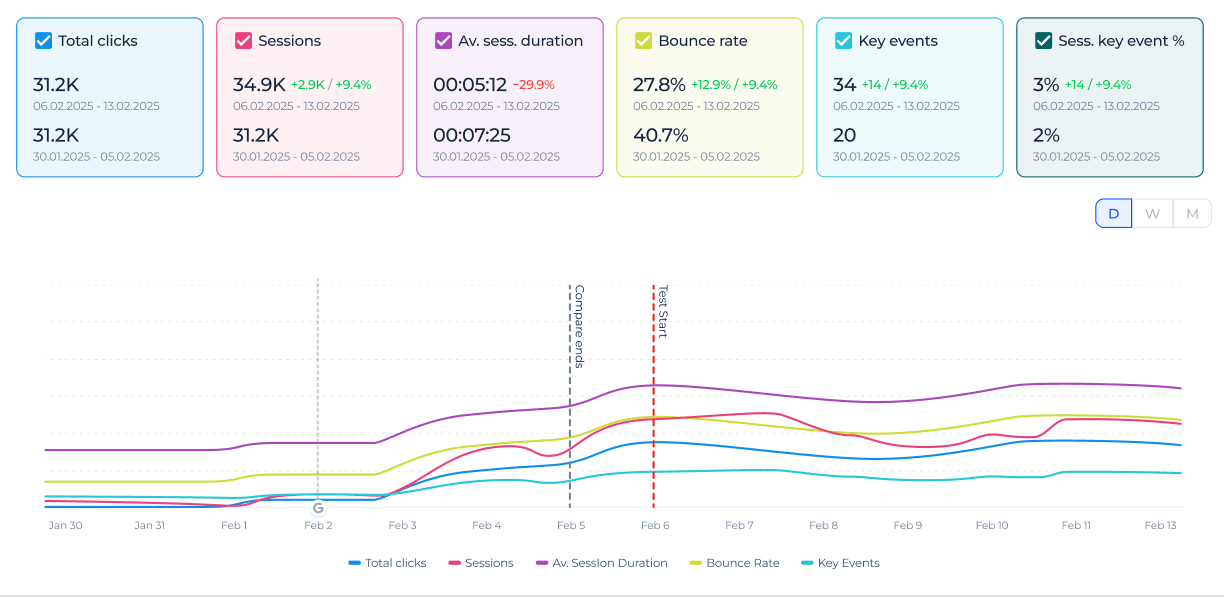
Páginas e palavras-chave
Cada experimento tem a sua própria página de detalhe com cartões de resumo, um gráfico, uma vista de Páginas e uma vista de Palavras-chave.
A vista de Páginas mostra como os URLs individuais evoluíram entre os dois períodos. A vista de Palavras-chave mostra a alteração ao nível da pesquisa a partir do Google Search Console.
As métricas do GA4 aparecem no resumo e ao nível da página, uma vez que são baseadas em páginas, enquanto a vista de Palavras-chave permanece baseada no GSC.
A vista de Páginas mostra como os URLs individuais evoluíram entre os dois períodos. A vista de Palavras-chave mostra a alteração ao nível da pesquisa a partir do Google Search Console.
As métricas do GA4 aparecem no resumo e ao nível da página, uma vez que são baseadas em páginas, enquanto a vista de Palavras-chave permanece baseada no GSC.
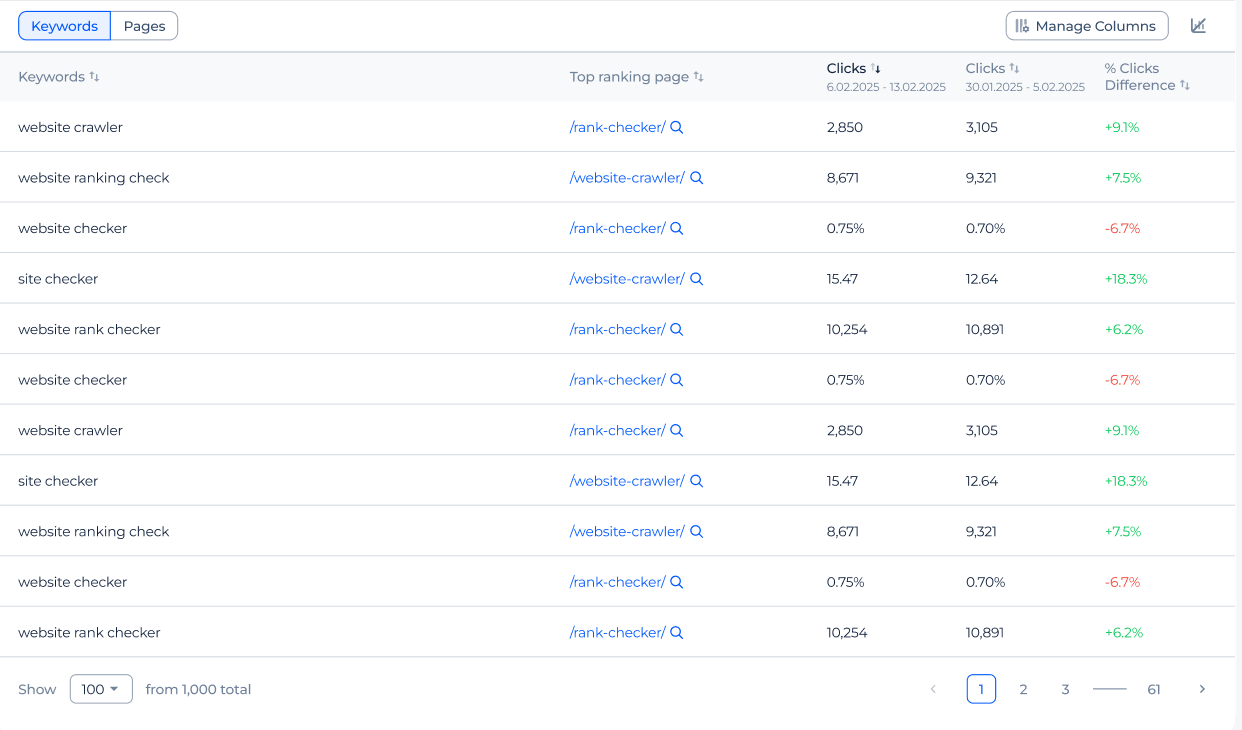
Registo de experimentos
O registo de experimentos reúne todos os testes de SEO do seu projeto num só lugar. Pode ver quem criou cada teste, o seu tipo, o seu estado e o seu resultado sem ter de perguntar.
Pesquise por nome e filtre por estado, tipo, âmbito ou pessoa que o criou. Qualquer pessoa com acesso ao projeto pode abrir um teste e rever os seus resultados.
Pesquise por nome e filtre por estado, tipo, âmbito ou pessoa que o criou. Qualquer pessoa com acesso ao projeto pode abrir um teste e rever os seus resultados.
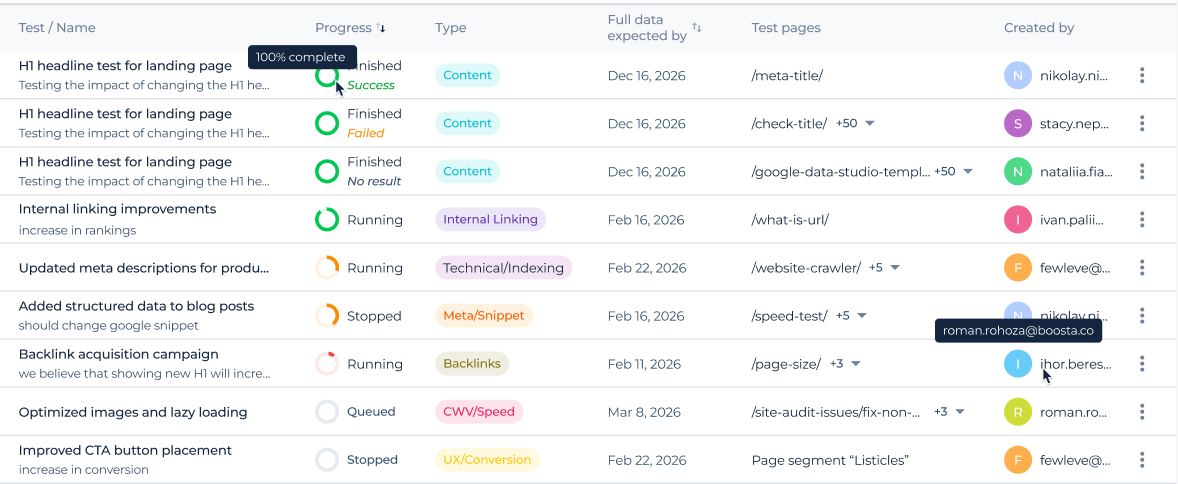
O que a ferramenta SEO Tests inclui
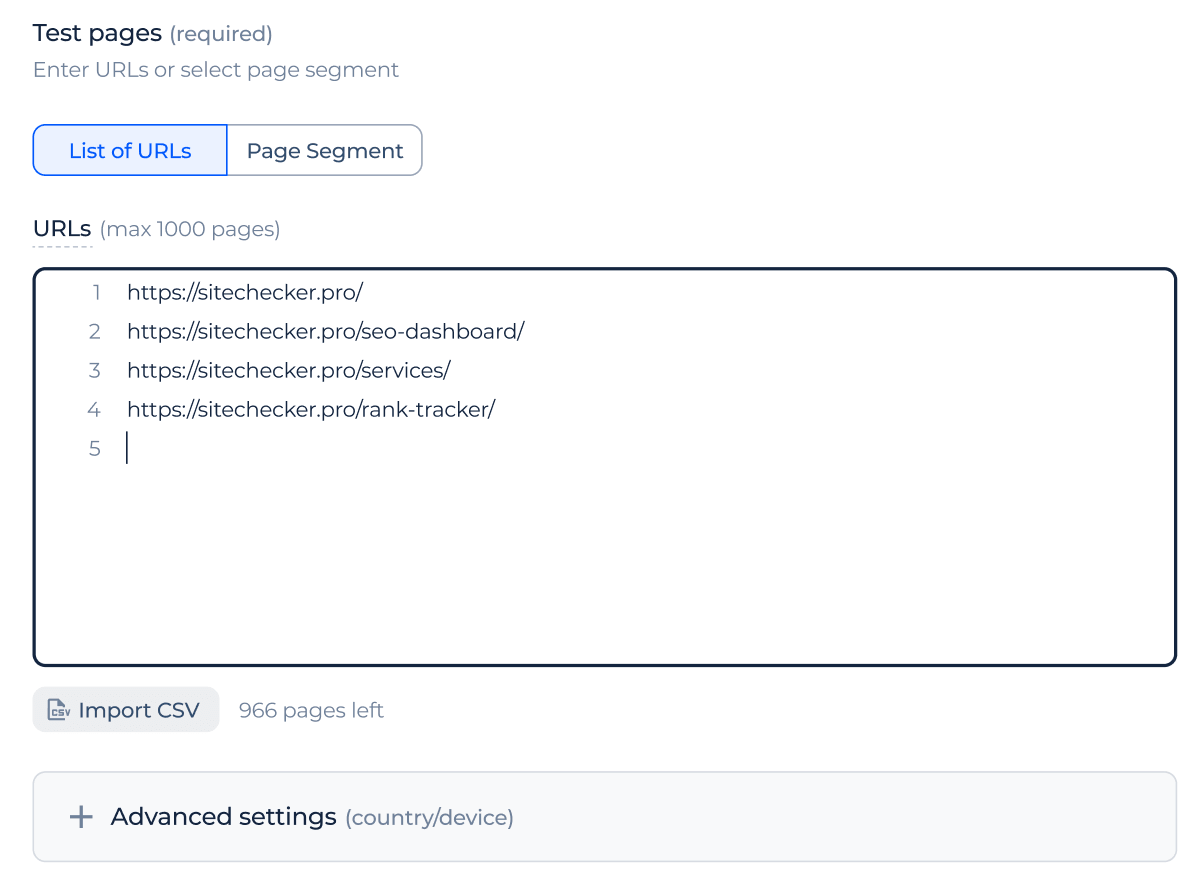
Âmbito por segmento ou lista de URLs
Pode definir o âmbito de um experimento com um segmento guardado ou uma lista de URLs. Adicione URLs manualmente, importe-os dos segmentos do seu projeto ou carregue-os por CSV.
Se utilizar um segmento, o teste permanece associado a esse segmento, pelo que o seu âmbito é atualizado quando o segmento também é.
Se utilizar um segmento, o teste permanece associado a esse segmento, pelo que o seu âmbito é atualizado quando o segmento também é.
Filtros de país e dispositivo
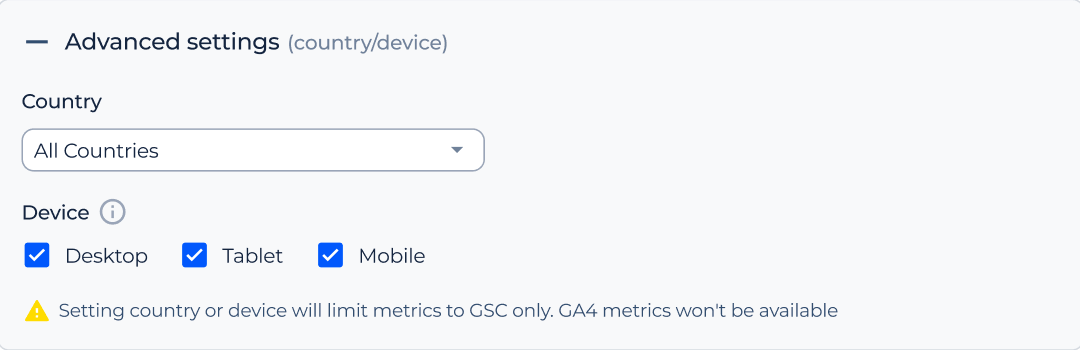
Cada experimento pode ser filtrado por país e dispositivo. O dispositivo inclui desktop, tablet e telemóvel, e pode selecionar um ou vários ao mesmo tempo.
Os filtros aplicam-se aos seus dados do Google Search Console da mesma forma que em todo o produto.
Os filtros aplicam-se aos seus dados do Google Search Console da mesma forma que em todo o produto.
Período de comparação automático
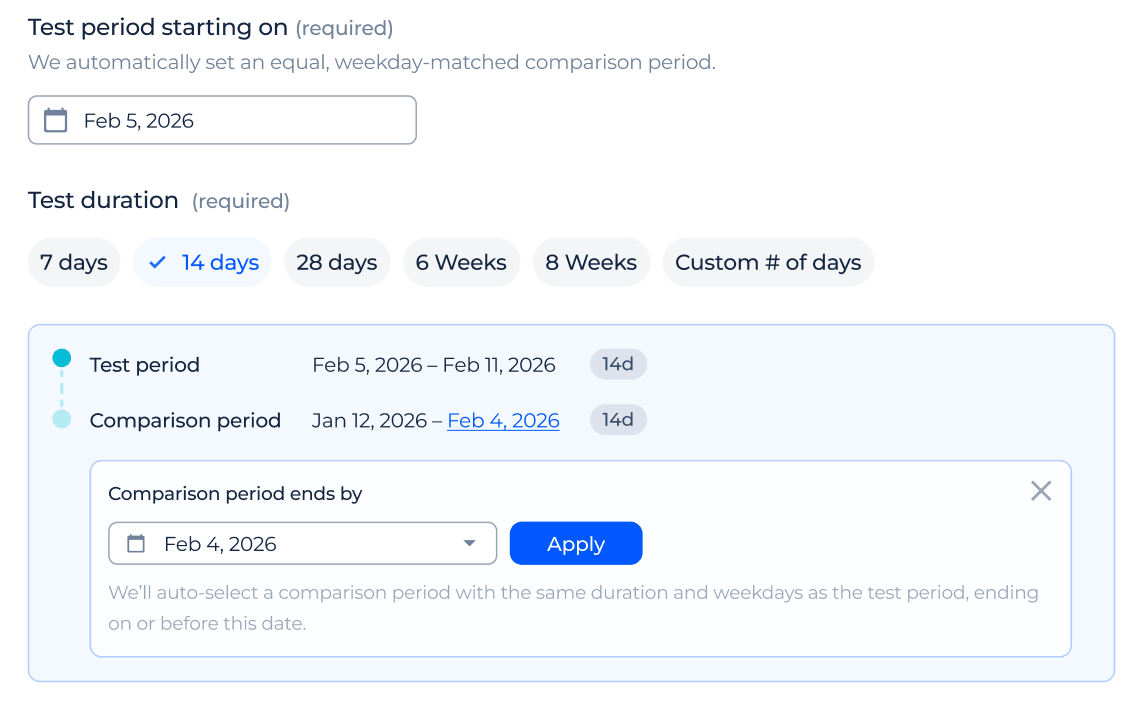
O período de comparação é calculado automaticamente, nunca escolhido manualmente. Utiliza o período anterior com a mesma duração e alinha-o pelo dia da semana, para que a comparação seja justa.
Pode definir uma data-limite opcional para controlar até onde o período de comparação pode recuar.
Pode definir uma data-limite opcional para controlar até onde o período de comparação pode recuar.
Métrica de sucesso e objetivo
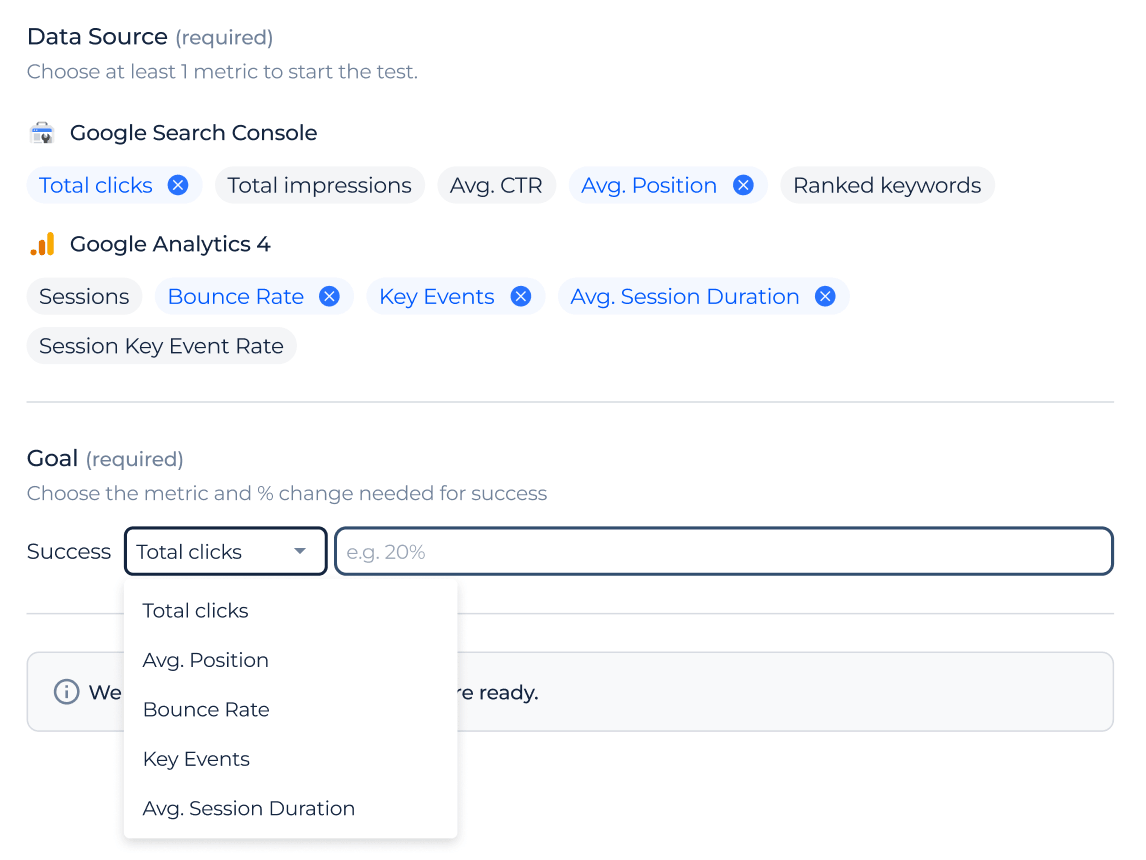
Cada experimento tem uma métrica de sucesso e um crescimento-alvo definido como percentagem.
Quando a alteração real atinge ou supera o objetivo, o resultado é marcado como Sucesso; caso contrário, como Falhou. Se não houver dados suficientes para avaliar a alteração, o resultado é marcado como Sem resultado.
Quando a alteração real atinge ou supera o objetivo, o resultado é marcado como Sucesso; caso contrário, como Falhou. Se não houver dados suficientes para avaliar a alteração, o resultado é marcado como Sem resultado.
Estado e progresso do teste
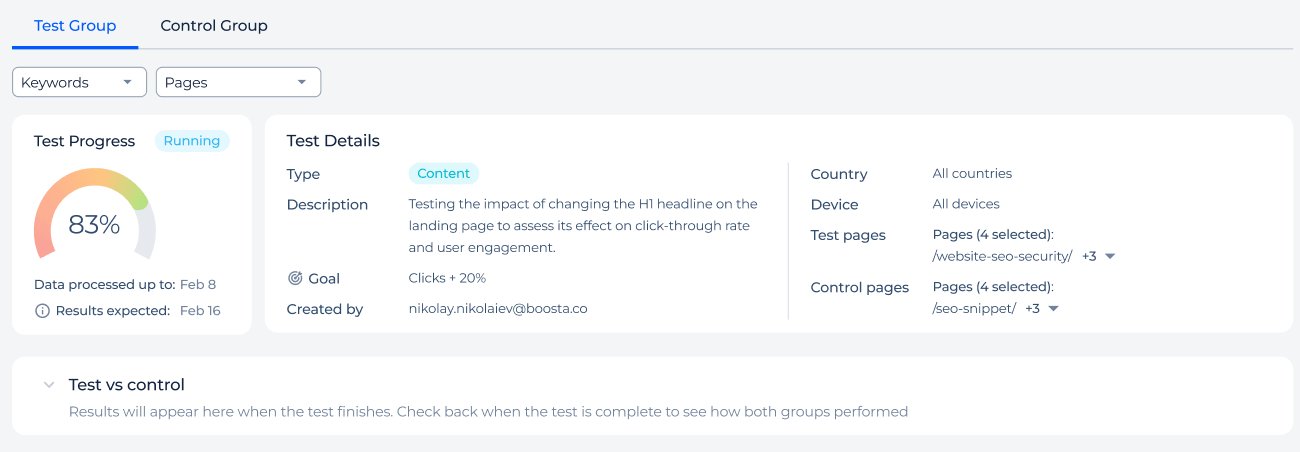
Cada teste passa pelos estados Em fila, Em curso, Concluído e Interrompido, com uma barra de progresso baseada no tempo decorrido.
Enquanto um teste está em curso, pode prolongá-lo adicionando mais dias, ou interrompê-lo antecipadamente mantendo os dados recolhidos até então. A página de detalhe também mostra quando são esperados os dados completos do resultado final.
Enquanto um teste está em curso, pode prolongá-lo adicionando mais dias, ou interrompê-lo antecipadamente mantendo os dados recolhidos até então. A página de detalhe também mostra quando são esperados os dados completos do resultado final.
Email de conclusão
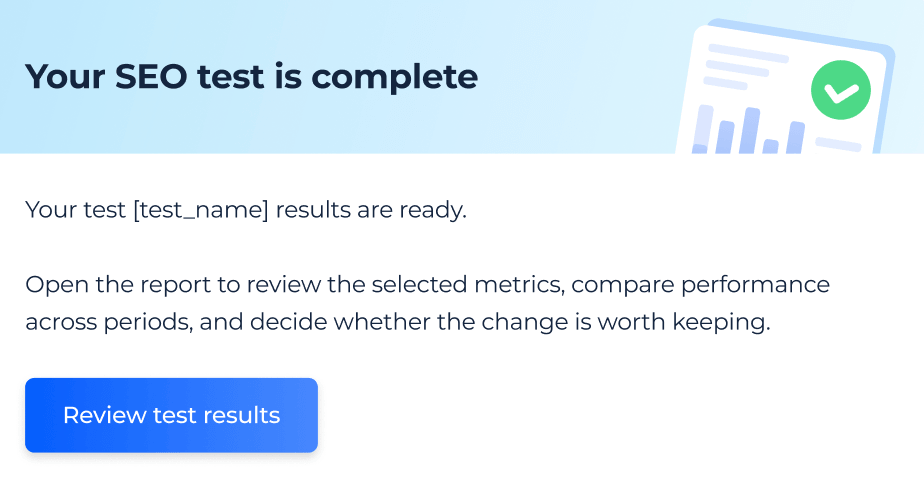
Quando um experimento termina, a pessoa que o criou recebe um email a informar que os resultados estão prontos. O email indica o resultado final como Sucesso, Falhou ou Sem resultado.
Não são enviados mais alertas, pelo que o registo permanece em silêncio até que um teste esteja de facto concluído.
Não são enviados mais alertas, pelo que o registo permanece em silêncio até que um teste esteja de facto concluído.
Perguntas frequentes
Qual é a diferença entre um teste de antes e depois e um teste com grupo de controlo?
Um teste de antes e depois compara um conjunto de páginas com o seu próprio desempenho passado. Um teste com grupo de controlo compara as páginas alteradas com páginas semelhantes deixadas inalteradas.
A versão com grupo de controlo ajuda a separar o efeito da sua alteração das tendências gerais de pesquisa.
A versão com grupo de controlo ajuda a separar o efeito da sua alteração das tendências gerais de pesquisa.
Preciso de ter o Google Search Console ligado para executar um experimento de SEO?
Sim, é necessária uma conta do Google Search Console ligada para cada experimento de SEO. Todo o experimento baseia-se em URLs e dados do GSC, mesmo que apenas mostre métricas do GA4.
Pode ligá-la através do GSC Dashboard e reutilizar os mesmos dados em todo o produto.
Pode ligá-la através do GSC Dashboard e reutilizar os mesmos dados em todo o produto.
Que métricas posso acompanhar num experimento de SEO?
A partir do Google Search Console pode acompanhar cliques, impressões, CTR, posição média e palavras-chave com ranking. A partir do GA4 pode adicionar sessões, taxa de rejeição, eventos-chave, duração média da sessão e taxa de eventos-chave por sessão.
As métricas do GA4 aparecem no resumo e ao nível da página, enquanto a vista de Palavras-chave permanece baseada no Google Search Console.
As métricas do GA4 aparecem no resumo e ao nível da página, enquanto a vista de Palavras-chave permanece baseada no Google Search Console.
Como decide a ferramenta se um experimento foi bem-sucedido ou falhou?
Escolhe uma métrica de sucesso e define um crescimento-alvo como percentagem.
Num teste de antes e depois, o resultado compara o período de teste com o período de comparação automático. Num teste com grupo de controlo, o resultado baseia-se no ganho líquido entre o seu grupo de teste e o grupo de controlo.
Se a alteração não puder ser medida de forma fiável, o experimento é marcado como Sem resultado.
Num teste de antes e depois, o resultado compara o período de teste com o período de comparação automático. Num teste com grupo de controlo, o resultado baseia-se no ganho líquido entre o seu grupo de teste e o grupo de controlo.
Se a alteração não puder ser medida de forma fiável, o experimento é marcado como Sem resultado.
Toda a minha equipa pode ver e gerir estes experimentos?
Qualquer pessoa com acesso ao projeto pode ver qualquer experimento, abrir os seus resultados e duplicá-lo. Só a pessoa que criou um teste o pode editar antes de começar, prolongá-lo, interrompê-lo ou eliminá-lo.
Isto mantém cada experimento de SEO visível para a equipa, deixando o controlo com quem o criou.
Isto mantém cada experimento de SEO visível para a equipa, deixando o controlo com quem o criou.
Como adiciono páginas a um experimento?
Pode adicionar páginas como um segmento guardado ou como uma lista de URLs. Os URLs podem ser adicionados manualmente, importados dos segmentos do seu projeto ou carregados por CSV.
Um teste com grupo de controlo utiliza uma lista de URLs separada que não pode sobrepor-se ao grupo de teste.
Um teste com grupo de controlo utiliza uma lista de URLs separada que não pode sobrepor-se ao grupo de teste.